
What Clerks AI actually does
Clerks AI is a downloadable set of skills that teaches ChatGPT and Claude Code a repeatable PDF-filling workflow. You provide an editable PDF form and the documents that contain the answers. The skill inspects the form fields, maps evidence to those fields, writes a completed PDF, and leaves notes about anything a person still needs to verify.
That evidence-first approach matters. A general AI assistant can summarize a passport or explain a form, but reliable form filling also requires PDF tooling, exact field identifiers, checkbox and dropdown handling, character-limit checks, and a deliberate “leave blank” decision when the source does not support an answer.
What to prepare before you start
- The current, blank PDF form from an official or trusted source.
- Documents that directly support the answers you expect to enter.
- ChatGPT with Codex or Claude Code installed and able to access the project folder.
- A few minutes to review the completed form against the original evidence.
How to fill a PDF form with Clerks AI
- 1
Buy and download the skill pack
Clerks AI costs $19.99 as a one-time purchase. After checkout, download clerks-pdf-skills.zip. The pack includes the PDF skills that inspect forms, prepare reusable form maps, and fill PDFs from supporting evidence.
- 2
Install the skills in ChatGPT or Claude Code
Choose the AI environment you already trust. In ChatGPT, open Codex, attach the zip, type @, choose Skill Installer, and ask it to install the skills. Claude Code users can add the downloaded skills to their local skill workflow.
- 3
Put the form and source files together
Create one project folder containing the blank PDF and the documents that hold the answers: a passport, prior application, tax record, spreadsheet, notes, or another reliable source. Clear file names make the task easier to review.
- 4
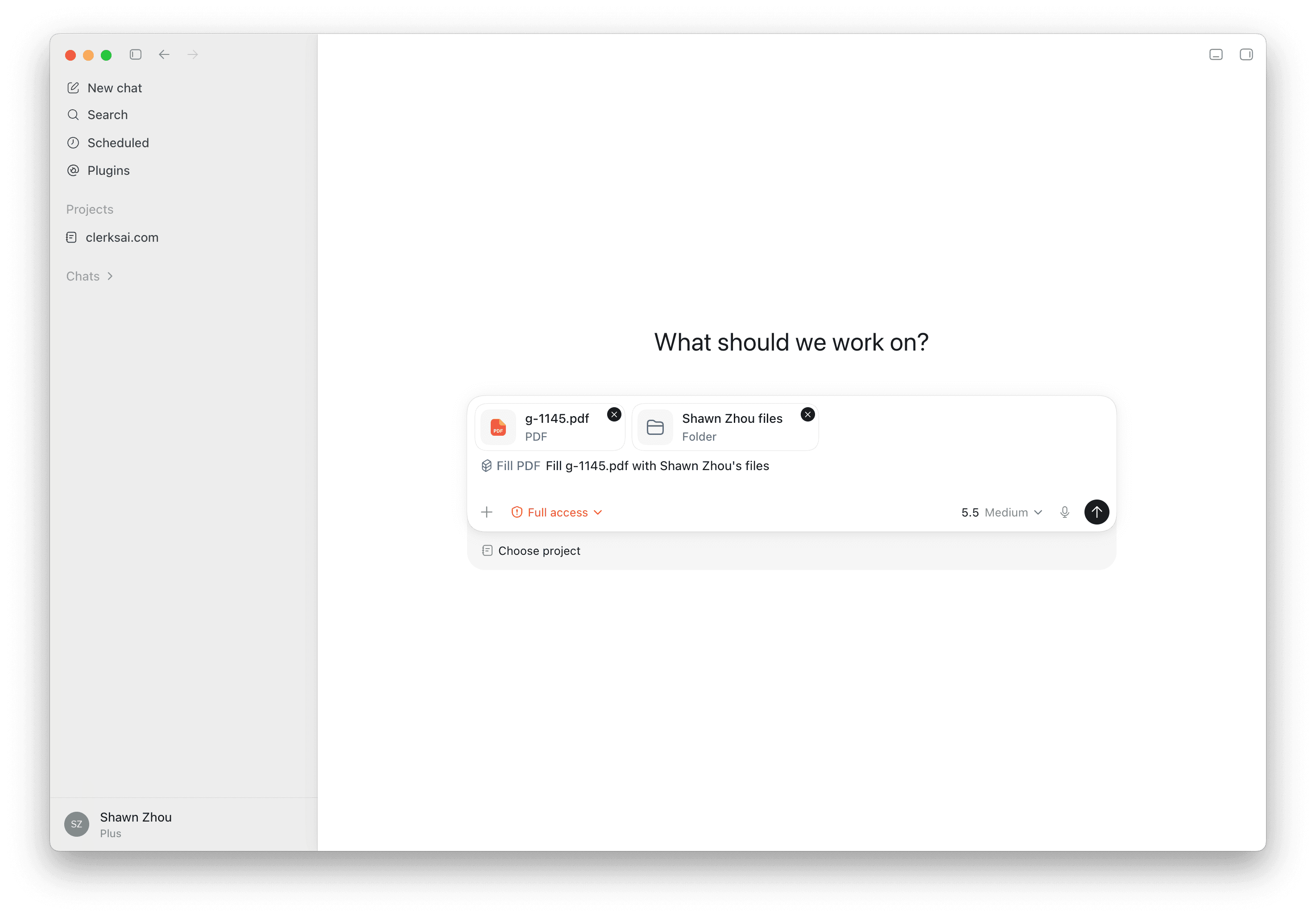
Ask the agent to fill the form
Give a direct prompt that names the blank form, the person or case, and the source files. For example: “Use fill-pdf to complete g-1145.pdf with Shawn Zhou’s info and files.”
- 5
Review the PDF and the evidence trail
Open the completed PDF and check every important field. Read the fill plan and action items, especially anything marked uncertain, not applicable, missing, or requiring a signature. The result is a draft for review—not professional legal, tax, medical, or filing advice.
How to review the result
Start with identity fields, dates, identification numbers, addresses, financial amounts, and any answer that changes which later sections apply. Confirm that text is not clipped and that checkboxes, radio buttons, and dropdowns display the intended value.
Then read the accompanying notes. A good result makes uncertainty visible. Missing evidence should become an action item, not a plausible-sounding guess. If a field requires judgment, a certification, or a signature, keep a person in control of that decision.
Save the reviewed PDF under a new name so the blank original remains untouched. For high-stakes forms, have the applicant and an appropriate qualified professional review the final version before submission.
A clearer privacy boundary
Clerks AI does not operate a document-upload service for the skill workflow, so Clerks AI does not receive or store the form or source files you give the agent. Your documents remain on your device and are processed within the AI product you choose.
That does not mean the workflow is “offline” or that no provider processes your data. ChatGPT and Claude have their own storage, retention, training, and account controls. Review the current terms for your plan, turn off model improvement where appropriate, and use a business or enterprise account when your organization requires those contractual protections.
Tips for better fills
- Name the exact target PDF instead of saying “fill this form.”
- Separate records for different people into clearly named folders.
- Tell the agent which source should win if two documents conflict.
- Do not ask the AI to invent missing facts; ask it to flag them.
- Keep the PDF editable until review is complete.
Sources
- Clerks AI PDF skill pack
Current purchase, installation, and usage instructions.
- OpenAI Codex
OpenAI workspace for running installed skills.
- Claude Code
Anthropic’s agentic coding environment.